












How Application Autoscaling Works for Retail Systems During Peak Hours
06/03/2026
767
Modern retail systems must support sharp spikes in customer activity. For example during seasonal sales, flash deals, or peak hours when many users browse products, check out carts, or redeem loyalty rewards simultaneously. Without the right infrastructure, such demand spikes can slow performance, cause errors, or even bring applications offline, which directly affects sales and brand reputation.
Application autoscaling is a cloud-native mechanism that helps retail applications remain responsive under varying loads by automatically adjusting compute resources based on real-time demand. In simple terms, autoscaling ensures that your application always has enough resources when traffic increases and scales back down when demand drops, optimizing both performance and cost.
In cloud environments like AWS, Google Cloud, or Microsoft Azure, autoscaling is typically implemented as part of horizontal scaling strategies, where new instances of an application or service are added or removed automatically in proportion to workload intensity. For example, during a flash sale when a user requests a surge, autoscaling adds new instances to share the load, preventing slowdowns and preserving a seamless customer experience. After the peak period, these extra resources are removed to reduce costs.
How Autoscaling Enhances Availability and User Experience in Retail
Application performance during high-demand windows directly impacts the customer experience. When autoscaling is enabled, the infrastructure can automatically respond to traffic patterns, adding more server instances to prevent response delays and reducing them during low traffic to save cost.
For retail, this means that during a big sale or promotional event, the online store remains fast and reliable, checkout processes stay responsive, and critical services such as inventory lookup and loyalty point updates continue without interruption. The automation inherent in autoscaling minimizes the need for manual intervention and helps ensure operations stay smooth even under unpredictable load conditions.
What Application Autoscaling Is and How It Works

Application autoscaling is a core capability in cloud environments that automatically adjusts an application’s computing resources based on real-time demand. Instead of manually adding or removing servers, autoscaling monitors defined performance metrics and makes scaling decisions so applications stay responsive and efficient. In retail systems where traffic can spike unpredictably during peak hours, this automation is essential to maintain performance without over-provisioning infrastructure.
How Autoscaling Works: The Basics
At its heart, application autoscaling involves continuous monitoring, metrics evaluation, and automated scaling actions. Cloud platforms such as AWS, Google Cloud, and Azure track performance signals (such as CPU utilization, request rates, memory usage, or other custom metrics) and take action when thresholds are reached:
- Monitoring: The system constantly collects metrics from application instances or containers.
- Triggering: When a metric crosses a predefined limit. For example, when CPU usage stays above 70%, the autoscaling policy triggers a scale-out event.
- Scaling Out: New application instances or resources are provisioned to share the load, spreading incoming requests across more servers.
- Scaling In: Once the demand declines and metrics fall below the “scale-in” threshold, excess resources are removed to reduce cost.
- Cooldown Periods: Many autoscaling implementations include a cooldown interval that prevents rapid flip-flopping between scale-out and scale-in decisions to avoid instability.
Horizontal vs Vertical Scaling
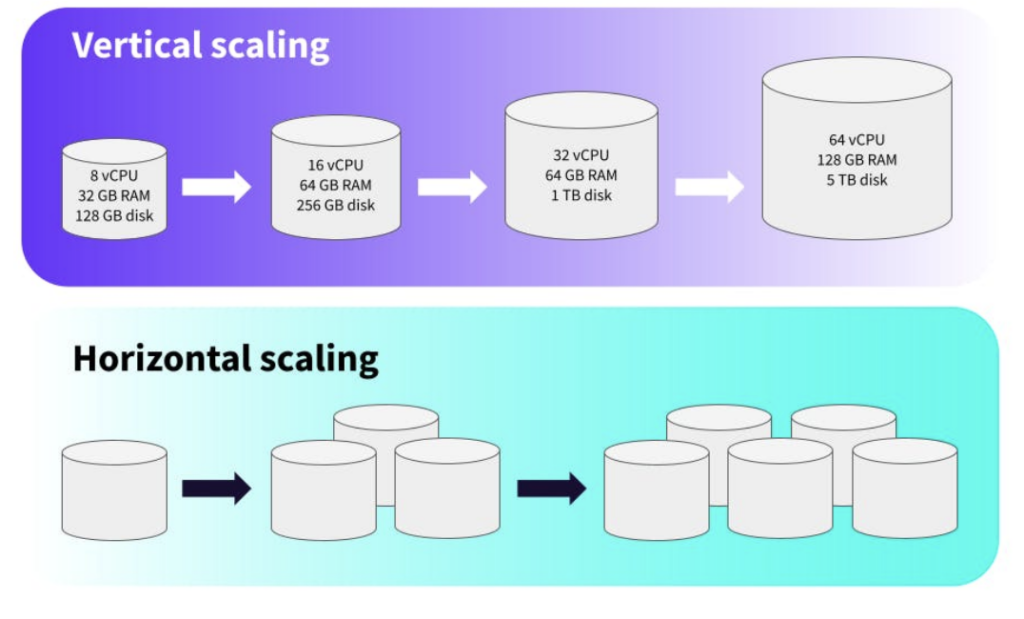
Autoscaling can work in two main ways:
- Horizontal autoscaling (scale out/in): Adds or removes separate instances (servers, virtual machines, or containers). This is the most common approach in modern cloud systems because it offers flexibility and fault tolerance. When traffic increases, new instances are spun up, and when traffic drops, they are removed, ensuring efficient resource usage.
- Vertical autoscaling (scale up/down): Adjusts the resources of an existing instance (such as adding more CPU or memory) without creating new instances. While possible in some environments, vertical autoscaling is less common for high-traffic retail applications because it often requires restarts and has practical limits.
Scaling Policies and Metrics
Application autoscaling relies on policies defined by the development or operations team. A policy specifies:
- Which metric to monitor: Typical choices include CPU usage, memory consumption, request rate, or custom signals (like queue length).
- Threshold values: The metric level that triggers scale-out or scale-in actions.
- Min/Max resource limits: The minimum number of instances to maintain and the maximum number allowed for scaling.
- Cooldown settings: A period after a scale action during which further scaling is paused to allow the system to stabilize.
Integration With Load Balancers and Health Checks
Autoscaling does not act alone. In most cloud environments, it works closely with:
- Load Balancers: Distribute incoming traffic evenly among available instances. When new instances are added, the load balancer automatically begins routing requests to them.
- Health Checks: Ensure only healthy instances receive traffic. If an instance fails, autoscaling groups can replace it without human action.
Together, these components maintain performance and uptime even during sudden influxes of users, such as during peak retail hours or flash sales.
Read more related blogs about Cloud Architecture:
- The Importance of Performance Testing and SupremeTech’s Expertise
- Triggers and Events: How AWS Lambda Connects with the World
Core Concepts Behind Application Autoscaling
Understanding application autoscaling begins with the fundamental idea that cloud systems should adjust themselves automatically in response to changing demands, especially during peak retail hours when traffic can surge unpredictably. Instead of relying on manual intervention, autoscaling ensures applications remain responsive, efficient, and cost-effective across fluctuating workloads.
Elastic Resource Adjustment
At its core, application autoscaling enables cloud infrastructures to automatically add or remove compute resources based on real-time performance metrics. This is done to maintain performance and availability without overprovisioning or underutilizing resources. When demand rises. For example, when many customers browse, search, or check out during a promotion, the autoscaling system detects increased workload and responds by scaling out additional instances. When demand drops, it scales in to remove excess resources, helping lower costs.
Horizontal vs. Vertical Scaling
Autoscaling operates through two main scaling strategies:
- Horizontal Scaling (Scale Out/In): This adds or removes whole instances of an application (such as servers or containers) to accommodate changes in demand. Horizontal scaling increases capacity by expanding the number of units handling the workload, making it highly suitable for stateless and distributed retail systems where load distribution matters most.
- Vertical Scaling (Scale Up/Down): This changes the resource capacity (such as CPU or memory) of an individual instance. Vertical scaling can be useful in limited scenarios but generally requires restarting the instance and may hit physical limits, making it less ideal for high-traffic retail sites.
Most modern retail applications favor horizontal autoscaling because it improves fault tolerance and responsiveness, especially when traffic patterns are unpredictable or grow rapidly.
Monitoring and Metrics
Critical to autoscaling are the metrics monitored by the system. Common signals include:
- CPU utilization
- Memory usage
- Network traffic
- Request rates per second
- Custom application-specific metrics
The autoscaler continuously observes these performance indicators. When any metric crosses a scaling threshold defined in the policy, the autoscaler will trigger appropriate scaling actions. For example, if CPU usage consistently exceeds a specified limit during a sales event, the system will automatically launch new instances to maintain performance.
Load Balancing and Health Checks
Load balancers and health checks are essential parts of the autoscaling ecosystem. When new instances are added, load balancers distribute incoming traffic evenly across all healthy instances to maintain consistent performance and avoid overloading any single resource. Health checks monitor the health of each instance and ensure that only functional units receive traffic. If an instance fails a health check, autoscaling policies can terminate it and replace it with a new one, supporting high availability.
Scheduled and Predictive Scaling
In addition to reactive scaling, responding when metrics exceed thresholds some systems support scheduled scaling (predefined rules based on times or events) and predictive scaling (using historical patterns and forecasting). Scheduled scaling prepares for known peak periods, such as daily lunchtime traffic surges or seasonal sales. Predictive autoscaling uses historical workload patterns and machine learning to predict demand and adjust capacity ahead of time, reducing the risk of under-provisioning during sudden demand spikes.
How Application Autoscaling Works During Peak Retail Hours
Application autoscaling is especially powerful in retail environments where traffic can surge dramatically during peak hours: such as flash sales, holiday campaigns, and big promotional events. During these periods, the system must dynamically adjust to maintain performance, handle increased requests, and ensure a smooth customer experience. Here’s a clear breakdown of how application autoscaling actually operates when demand spikes and then recedes.
Detecting Demand Surges in Real Time
During peak hours, an autoscaler constantly monitors key performance metrics such as CPU utilization, request rate, or other custom signals from your application instances. When these metrics cross predefined thresholds, the autoscaler interprets this as increased demand and begins scaling actions. This monitoring happens every few seconds or minutes, allowing systems to react quickly to changing traffic patterns.
Scaling Out: Adding Resources
When a trigger is reached, the autoscaler performs a scale-out action by creating additional compute resources. These can be new server instances, containers, or pods depending on your architecture. For example:
- In a Kubernetes environment, additional pods are automatically added.
- In cloud virtual machine setups, new VMs are spun up and configured as part of an autoscaling group.
Each new unit increases your application’s capacity to handle more concurrent users or transactions. In some systems, replication means new pods or instances are exact copies of your application, enabling redundancy and fault tolerance as traffic grows.
Load Balancing and Health Checks
Autoscaling works in concert with load balancers, which route incoming requests evenly across all available instances. When new instances come online, the load balancer begins sending traffic to them almost immediately. Health checks ensure only properly initiated instances participate. If an instance fails a health check, it’s removed from the pool, and the autoscaler may create a replacement. This integration maintains performance and availability during rapid traffic changes.
Predictive and Scheduled Scaling
Reactive autoscaling which is responding to real-time conditions is common, but many retail scenarios benefit from predictive or scheduled scaling as well. Predictive autoscaling uses historical patterns and forecasting models to add capacity before traffic surges occur, which helps avoid lag during sudden increases in demand. For example, if an application consistently sees traffic spikes around lunchtime on weekdays, predictive autoscaling can start adding capacity ahead of that window.
Scheduled scaling is another useful tactic where scaling rules are triggered at predefined times such as starting extra instances before a planned promotion goes live and removing them after it ends. Retailers can set these schedules based on predictable peak periods to ensure adequate capacity is available right when it’s needed.
Stabilization and Scale-In After Peaks
Once demand begins to subside after peak hours, the autoscaler enters a scale-in phase. Before reducing resources, the system often observes a stabilization period to make sure the drop in demand is sustained and not just a temporary dip. This prevents frequent and unnecessary scale-in/scale-out cycles that can destabilize performance or incur extra costs.
During this phase, extra instances are gradually removed until the system reaches its minimum configured capacity. This ensures cost savings without sacrificing performance under moderate load.
Benefits of Application Autoscaling for Retail Performance and Cost
For retail systems, application autoscaling delivers both technical performance benefits and business-level cost advantages making it a key capability for modern cloud-native architectures. When designed well, autoscaling helps retail applications stay responsive during peak demand while avoiding unnecessary infrastructure costs during quieter periods.
Maintains Performance During Peaks
One of the clearest benefits of autoscaling is consistent performance under fluctuating workloads. This prevents slow response times, timeout errors, or service outages that can directly affect conversions and customer satisfaction. Since resources grow with demand, response times remain stable even when load surges
Improves Availability and Fault Tolerance
Autoscaling improves overall system resiliency by distributing work across multiple instances and automatically replacing failed ones. If a server becomes unhealthy during peak activity, autoscaling can launch new instances and redistribute traffic to healthy ones, preserving uptime without manual intervention. This is especially important for retail systems that must remain available 24/7 and serve global traffic patterns reliably.
Supports Scalability at Global Scale
Retail brands serving customers in multiple regions benefit from autoscaling’s ability to scale resources across geographies. Combined with load balancing, autoscaling allows platforms to serve users more efficiently by bringing compute resources closer to demand, reducing latency and improving the customer experience worldwide.
Linking Benefits to SupremeTech Expertise
Implementing application autoscaling effectively still requires expertise, particularly when retail leaders need help architecting, configuring, and optimizing autoscaling policies that match real-world traffic patterns. That’s where SupremeTech’s cloud and DevOps capabilities become a competitive advantage for retail companies.
SupremeTech’s Cloud Infrastructure & DevOps services help retailers design and deploy cloud environments that take full advantage of autoscaling. The team provides:
- Architecture planning and configuration tailored to retail workloads, ensuring autoscaling policies are aligned with traffic behaviors.
- Migration and optimization services to transition legacy systems into cloud environments that support scalable, autoscaled deployments.
- Ongoing performance tuning and integration with monitoring tools so autoscaling triggers are responsive and cost-efficient.
By combining autoscaling with structured cloud architecture guidance, retailers can achieve the performance, cost efficiency, and reliability needed to deliver exceptional customer experiences even under unpredictable peak demand.
How SupremeTech Implemented Autoscaling for a High-Traffic Retail Application
In one retail application project, SupremeTech designed a system capable of handling sudden spikes in user activity during peak hours and promotional campaigns. The goal was to ensure that ordering and payment experiences remained fast and stable even when traffic increased rapidly.
To achieve this, the platform was deployed on AWS Cloud with services managed through Amazon ECS. The infrastructure automatically scaled out when request volume increased and scaled down when traffic returned to normal levels. This allowed the system to maintain stable performance while optimizing infrastructure usage.
In addition, AWS WAF was implemented to protect the platform from abnormal or malicious traffic. Large-scale performance testing was also conducted before release to simulate peak conditions. With this autoscaling architecture, the application can handle significant traffic surges while maintaining a smooth and reliable user experience.
Conclusion
Application autoscaling ensures retail systems stay responsive and cost-efficient even under unpredictable peak traffic. By automatically scaling resources based on demand, retailers can maintain performance and availability during promotions, holiday rushes, and flash sales. When implemented with expert guidance, such as that provided by SupremeTech’s cloud and DevOps services, autoscaling becomes a core enabler of resilient, scalable retail infrastructure. As digital commerce grows, mastering autoscaling will be essential for delivering seamless customer experiences without excessive cloud costs.
📩 Read more articles about us at our blogs.
☎️Contact us to see how we can support your loyalty app strategy.
Application autoscaling is a cloud capability that dynamically adjusts compute resources based on real-time demand to ensure performance and cost optimization during traffic spikes.
Autoscaling monitors key metrics and automatically adds resources when demand increases, preventing slowdowns or outages and maintaining a seamless user experience.
Yes. Autoscaling scales down resources when demand drops, ensuring retailers pay only for what they use and reducing unnecessary cloud expenditure.
Triggers can include CPU usage, memory utilization, number of requests, or custom metrics tied to ecommerce traffic levels.
Yes. Most cloud providers offer auto scaling features that are accessible and affordable for small retail businesses.