


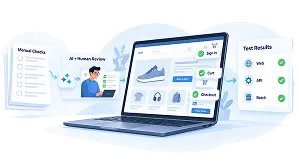


Lottie Animation: Bring Your Web Pages to Life
17/11/2026
8
Imagine visiting an app or website and being captivated by smooth, vibrant animations that bring ideas to life. CSS and JavaScript can achieve these effects, but Lottie animation offers a lighter and more flexible way to do it. With a Lottie animation, designers hand over motion as a small JSON file, and developers add it to a page with a few lines of code. In this guide, you will learn what Lottie animation is, how it works under the hood, and how to add it to your website step by step.
Challenges of Animating a Modern Landing Page
During my time working on the OTTclouds project, I encountered an exciting yet challenging task: creating a landing page brought to life with vibrant, seamless animations and rich, captivating effects. The goal was ambitious:
- Sharp, smooth: Smooth, clear motion, creating an impressive user experience.
- Good compatibility: Runs smoothly on both web and mobile platforms, without compatibility issues with different devices.
- Optimized performance: Animation does not slow down the website or affect loading speed, ensuring fast page load times.
- Save development time: Integrating pre-designed animations should be quick, saving programming time.
To bring these animations to life, I explored several traditional methods, such as using GIFs or videos. While these techniques have been widely adopted, they often struggle to meet the high standards of efficiency and quality demanded by modern web experiences. Let’s dive into an analysis of their strengths and limitations.
1. GIF

Advantages:
- Easy to use: Add the GIF file to a website or app, and it will instantly display.
- Highly compatible: GIFs work well on most browsers and devices.
Limitations:
- Large file size: GIFs often have large file sizes, especially with complex or lengthy animations, which can lead to long page load times.
- Lack of smoothness: GIFs only support up to 256 colors, sometimes resulting in less sharp and smooth images.
- Not flexible: Cannot easily edit or interact with animations.
2. HTML Video Tag

Advantages:
- High quality: Video supports high resolution and better color reproduction than GIF.
- Flexible customization: Control options like pause, fast forward, or auto-repeat can be added.
Limitations:
- Still large file size: Although better compressed than GIFs, videos still occupy much space.
- Difficult to integrate into the interface: Videos are difficult to synchronize with other elements on the web because the video background will cover the website background.
While GIFs and videos can create animations, they have some limitations:
- Large GIFs and videos slow down page load times, affecting user experience.
- GIFs have limited resolution, while videos are heavy and difficult to integrate into the interface.
Therefore, they are not the optimal solution for the smooth, sharp, and flexible effects requirement. At this point, Lottie Animation becomes the ideal choice, helping you create sharp, lightweight animations that are easy to integrate into your website without affecting performance. Let’s find out with me.
What is Lottie Animation?
Lottie Animation is a powerful open-source library that allows developers to integrate crisp, smooth animations into their apps and websites. Built on JSON format, Lottie can directly convert animation files from design software like Adobe After Effects into lightweight, highly compatible, and easily adjustable effects. Thus, it is not only an animation tool but also a bridge between design and top-notch user experience.
In simple terms, a Lottie animation is a vector animation stored as a JSON file. Because the file describes shapes, colors and keyframes instead of storing every frame as an image, a Lottie animation stays sharp at any screen size and is usually much smaller than the same animation exported as a GIF or video. The format was open-sourced by Airbnb in 2017 and named after Lotte Reiniger, a pioneer of silhouette animation. Today, it also has a compressed variant called dotLottie (.lottie), which bundles one or more animations and their assets into a single file.
How to Use Lottie Animation in Your Project
1. Get a Lottie animation file
To implement Lottie’s animation, you first need an animation file saved in JSON format. If you don’t have a Lottie JSON file yet, check out Lottie Animation Market or Lottie Files, where there are many animations for you to refer to. You can also use Adobe After Effects to design and export your animations in JSON format.
2. Test your Lottie animation
Before you start implementing your animation, test it to see if it works properly. Since opening the JSON file will not tell you much, you can use the Lottie Preview tool. With this tool, you can drag and drop your JSON file and quickly see if it works properly.
3. Implement scripts
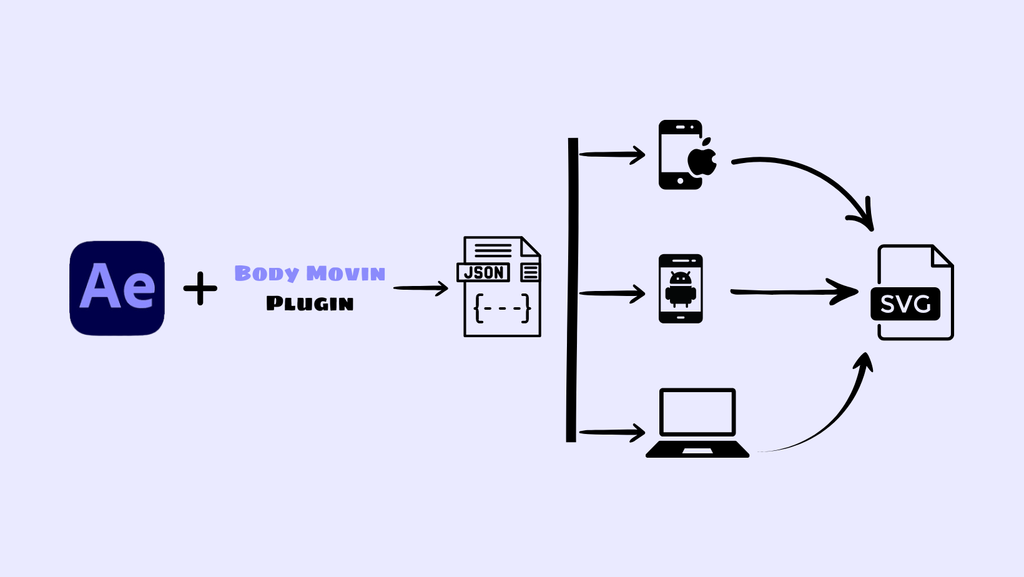
Once you have a working Lottie JSON file, you can display it on your web with the necessary implementations to convert JSON into SVG animations. This process is as simple as adding any other JS library to your HTML page.

4. Load Animation
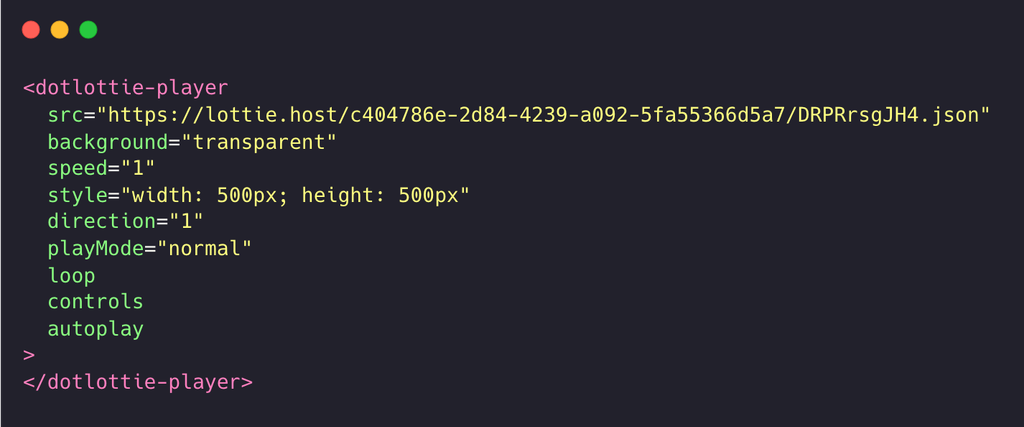
At this point, initialize your JSON file in HTML code with dotlottie-player.
5. Animation Adjustments
We can customize more properties for the animation like:
- Speed
- Loop
- Autoplay
- Background-color
Now, enjoy the Lottie animation example here!
How Lottie Animation Works Under the Hood
Lottie converts animations from Adobe After Effects into JSON format using the Bodymovin plugin. This JSON file contains information about motion elements such as position, color, and speed. The Lottie library then uses JavaScript to render the animation on the web or mobile, saving space and speeding up page load times. Lottie allows you to easily adjust animation properties like speed and color without editing the original file.
Real-World Applications of Lottie Animation
When working on the OTTclouds project, I discovered the true power of Lottie animation. Beyond simple loading spinners or success icons, it shines in handling complex animations.
Lottie transforms time-consuming animations into lightweight, interactive visuals, making even advanced transitions effortless to implement. It’s a game-changer for creating polished, professional designs with minimal coding effort. Lottie is the perfect choice for adding a professional touch to any application.
Advantages and Limitations of Lottie Animation
1. Advantages
- Optimized performance:
Lottie uses JSON format, which greatly reduces file size compared to GIF and video, making websites or applications load faster without losing quality.
- High quality:
The animations in Lottie are high resolution and sharp, with the ability to display complex details without losing image quality.
- Multi-platform compatibility:
Lottie works smoothly on both the web and mobile, supporting many platforms without compatibility issues.
- Easy integration:
Integrating Lottie into an application or website is extremely easy. You only need a few lines of code to embed animations without complicated processing. - High flexibility:
Lottie allows you to change the speed, adjust the color, or control the animation in real time, allowing for strong user interaction.
- Save development time:
You can use pre-designed animations without programming from scratch, saving a lot of time.
2. Limitations
- Depends on design tools:
To create animations, you need to rely on design tools like After Effects. Which can increase the complexity of the design process.
Conclusion
Lottie animation is a powerful tool for creating smooth, sharp, and optimized animations. Its easy integration and superior performance enhance the user experience and save development time. Try adding a Lottie animation to your next landing page and turn your creative ideas into dynamic motion without slowing your site down.
Ready to add Lottie animation to your own website or app? SupremeTech designs and builds web applications, animated landing pages and streaming products such as OTTclouds for clients in Japan and other markets, and our custom software development team can take your idea from motion design to launch. Contact SupremeTech to talk through your project.
Lottie Animation FAQs
Lottie animation is used for loading indicators, onboarding screens, animated icons, landing page illustrations, and micro-interactions such as button feedback. It suits any place where you want smooth motion without the weight of a video.
The Lottie player libraries are open source and free to use. Many animations on LottieFiles are free as well, while some marketplaces sell premium animations and LottieFiles offers paid plans for teams.
A Lottie animation is stored as a JSON file. You can also use the dotLottie (.lottie) format, a compressed archive that is smaller and can hold several animations and their images in one file.
Not necessarily. After Effects with the Bodymovin plugin is the classic workflow, but you can also create or edit Lottie files with web-based editors such as the ones on LottieFiles and with plugins for design tools like Figma.