















How to Analyze AWS GuardDuty Finding: Step-by-Step Guide
10/09/2026
236
1. Read and Analyze Aws Guardduty Finding
Description Information
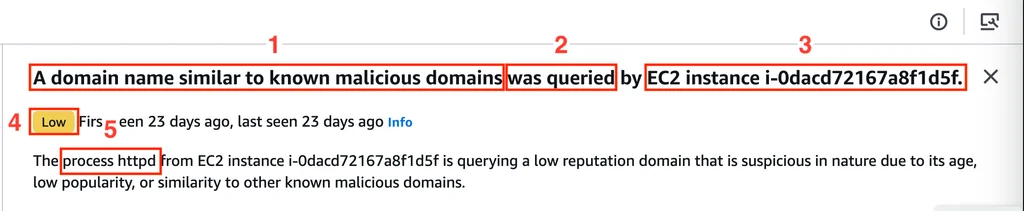
When reading the Finding’s description, below is the information worth noting, based on the numbering shown in the attached image above:
1 – A domain name similar to malicious domains already known to GuardDuty
2 – This domain has been resolved
3 – By EC2 instance id i-Odacd72167a8f1d5f
4 – This Finding has LOW severity: GuardDuty performed a malware scan on the server and found nothing dangerous.
5 – The domain resolution was performed by the httpd process
Action Information
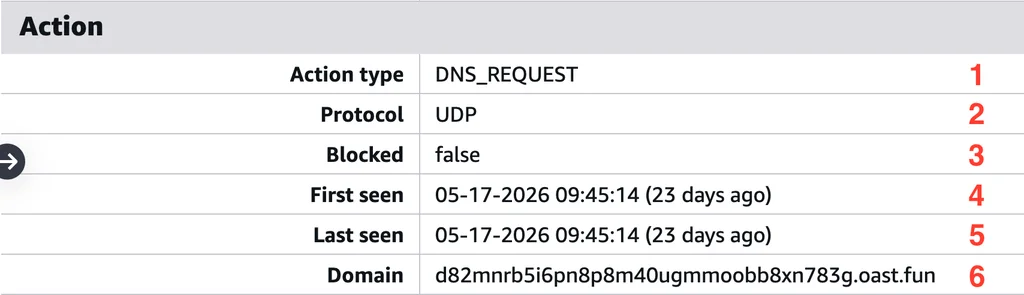
The Action field tells us exactly what happened and when it happened.
1 A DNS request was made
2 Protocol used for DNS resolution: UDP
3 Was any blocking action taken: NO
4 First detected time: 09:45:14 AM (local time), May 17, 2026
5 Last detected time: 09:45:14 AM (local time), May 17, 2026
6 Malicious domain resolved: d82mnrb5i6pn8p8m40ugmmoobb8xn783g[.]oast[.]fun. The brackets [] are added to prevent accidental clicking.
2. Find Logs Around the Time the Event Occurred
Current system architecture:
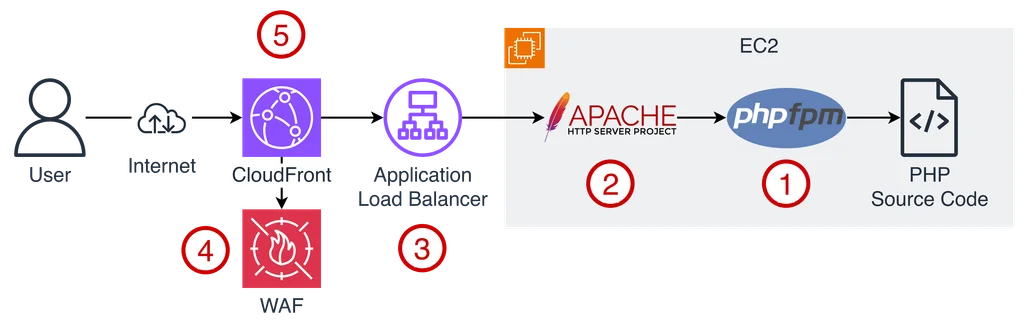
Because there is only one single path to access the system, which is through HTTP requests.
Access logs were collected at nodes 1, 2, 3, 4, 5, around the time GuardDuty detected the abnormal DNS query: 09:45:14 AM (local time), May 17, 2026
1. Collect and Analyze PHP-FPM Access Log
CloudWatch Log Insights was used to look for Apache access logs at the time the abnormal DNS query was detected. Result: no PHP-FPM access log was found with a suspicious pattern or client IP.
2. Collect and Analyze Apache Access Log
CloudWatch Log Insights was used to analyze the Apache access log at the time the abnormal DNS query was detected.
Result: there is 1 access log with a URI path not supported by the application.

Log line content:
Analysis:
- The time the access log was written to the file by Apache: 17/May/2026:11:45:14 +0900, matches the time GuardDuty detected the abnormal DNS query.
- Note: the time the Apache access log was pushed to CloudWatch Log (2026-05-17T09:45:19.574+07:00) is a few seconds later than the time the Apache access log was written to the EC2 instance’s disk (17/May/2026:11:45:14 +0900). The reason is that pushing logs to CloudWatch Log is not done in real time and has some latency.
- The client’s public IP address 206[.]189[.]156[.]69 was flagged as unsafe by VirusTotal.
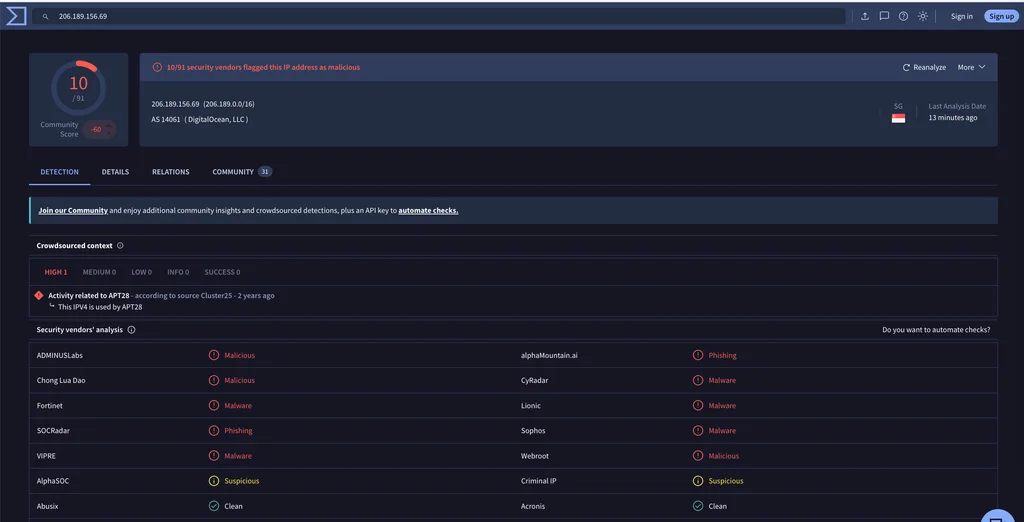
- Request URI not supported by the application: `/?XDEBUG_SESSI
- Request method: GET
- Response status code: 307
Question raised:
Where is the payload containing the malicious domain d82mnrb5i6pn8p8m40ugmmoobb8xn783g[.]oast[.]fun located?
3. Collect and Analyze ALB Access Log
Athena was used to query and analyze the ALB access log at the time the abnormal DNS query was detected, with request URI = `/?XDEBUG_SESSI
SELECT * FROM "default"."alb_access_logs"
WHERE day = '2026/05/17' and request_url like '%XDEBUG_SESSION_START%'
limit 10;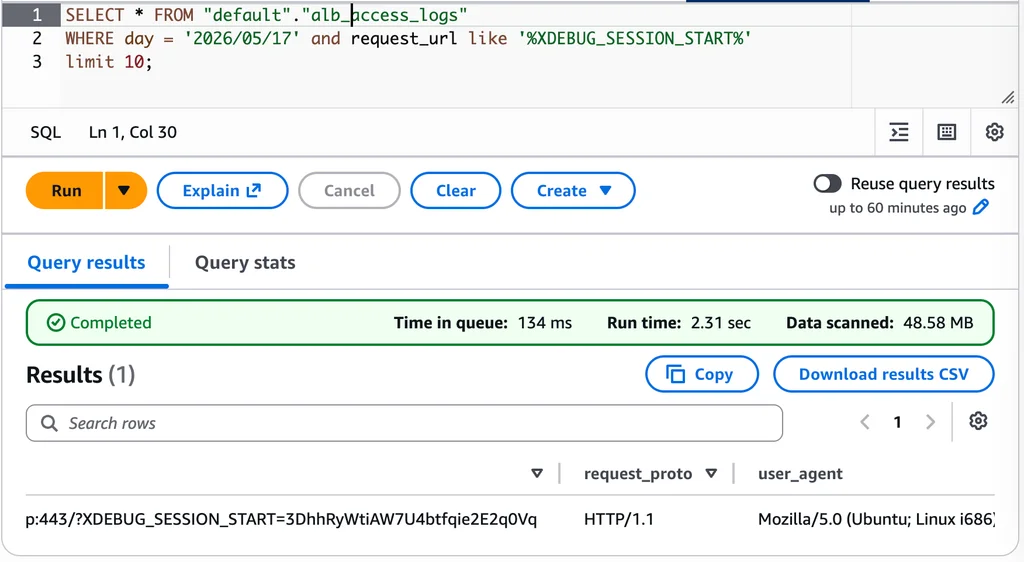
Log line content:
Analysis:
- There is exactly 1 request with request URI = `/?XDEBUG_SESSI
- Response status code: 307
- WAF forwarded this request, did not block it
- The time the access log was recorded matches the time GuardDuty detected the abnormal DNS query
- No payload containing the malicious domain was found
4. Collect and Analyze WAF Log
Athena was used to query and analyze the WAF log at the time the abnormal DNS query was detected, with request URI = `/?XDEBUG_SESSI
SELECT * FROM "default"."waf_log"
WHERE date = '2026/05/17' and httprequest.args like '%XDEBUG_SESSION_START%';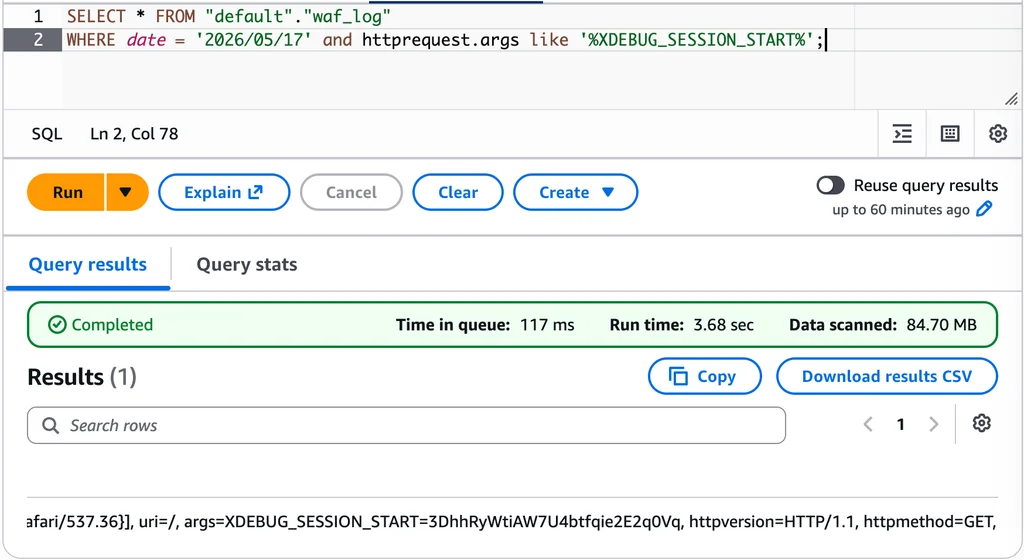
Log line content:
Analysis:
- There is exactly 1 request with request URI = `/?XDEBUG_SESSI
- The malicious domain is located in the X-Forwarded-For header
{name=X-Forwarded-For, value=d82mnrb5i6pn8p8m40ugmmoobb8xn783g.oast.fun, 167.253.157.114}Question raised:
Why does Apache (httpd) perform domain resolution if the X-Forwarded-For request header contains a domain value?
3. Find the Root Cause
Question raised: Can X-Forwarded-For contain a domain instead of an IP address?
According to Mozilla’s documentation describing the X-Forwarded-For header, the header syntax is:
X-Forwarded-For: <client>, <proxy>
X-Forwarded-For: <client>, <proxy>, …, <proxyN>
Where:
- client: The client’s IP address
- proxy: The proxy’s IP address
The value of the X-Forwarded-For header must contain an IP address. In this case, the hacker manipulated the value of X-Forwarded-For, injecting a domain instead of an IP.
Question raised: Why is domain resolution performed if a domain exists in the X-Forwarded-For header?
When investigating the Apache configuration, the following config was found:
RemoteIPHeader X-Forwarded-ForThe purpose of this config is to help Apache accurately determine the client IP based on the X-Forwarded-For header, and record it in the access log.
RemoteIPHeader is a directive within the mod_remoteip module.
When analyzing the source code of the mod_remoteip module, in the file modules/metadata/mod_remoteip.c, the function apr_sockaddr_info_get is called at line 637 to convert a hostname or IP into an apr_sockaddr_t struct.
        /* We map as IPv4 rather than IPv6 for equivalent host names
         * or IPV4OVERIPV6
         */
        rv = apr_sockaddr_info_get(&temp_sa,  parse_remote,
                                   APR_UNSPEC, temp_sa->port,
                                   APR_IPV4_ADDR_OK, r->pool);
To check what the apr_sockaddr_info_get function does, the Apache Portable Runtime (APR) source code was downloaded for analysis.
Since this is a Linux server, the file network_io/unix/sockaddr.c was examined.
The apr_sockaddr_info_get function indirectly calls the getaddrinfo function, which is used for DNS resolution, at line 396.
#endif /* OSF1 */
    }
    error = getaddrinfo(hostname, servname, &hints, &ai_list);
Root cause: Apache is configured with RemoteIPHeader X-Forwarded-For; the malicious domain is injected into the X-Forwarded-For header, triggering the DNS resolution process for the malicious domain.
4. Reproduce the Issue
Steps taken:
- Run tcpdump in the background, with a filter for DNS traffic to capture DNS traffic.
- Initiate an HTTP request to the dev server using CURL with an X-Forwarded-For header containing a test domain
- Observe the tcpdump log
Test command:

Result: Apache performed DNS resolution for the test domain abc.com immediately after the curl request was made, confirming the above conclusion is correct.
5. Why Did the Hacker Perform This Action?
When the server performs DNS resolution to a domain/DNS server controlled by the hacker, if the DNS resolver resides directly on the server, based on how DNS lookups work, the hacker can determine which public IP address the server uses to interact with resources on the Internet.
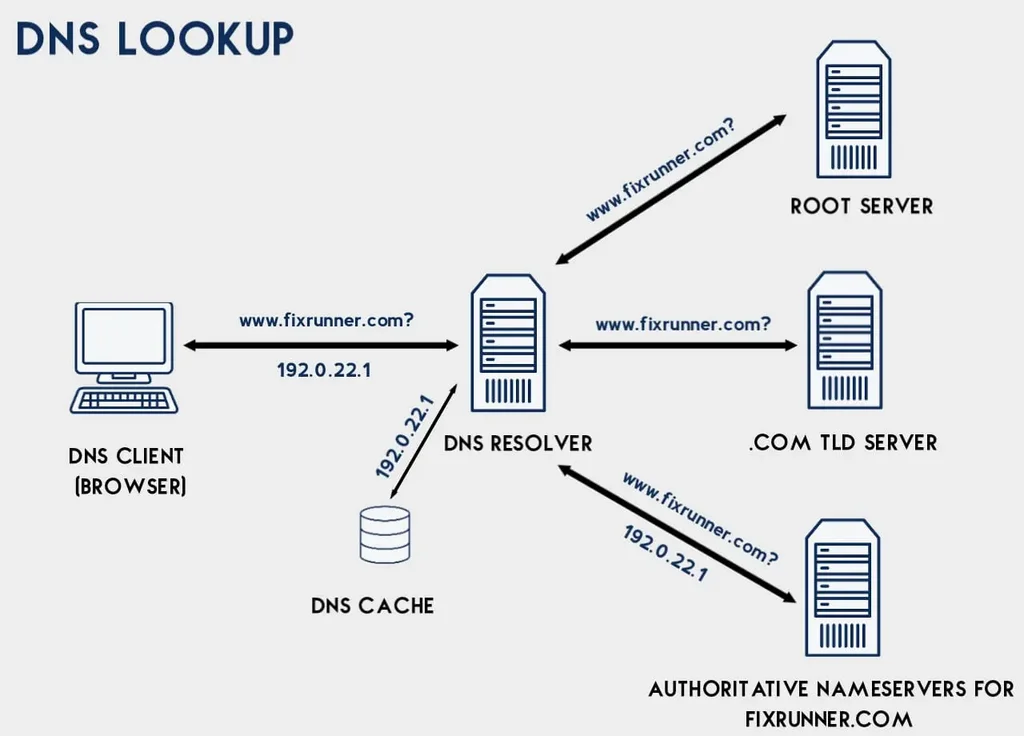
This technique is called: Out-of-band (OOB) traffic using DNS and X-Forwarded-For. It falls under the Reconnaissance phase in the MITRE Framework.
6. Remediation Plan
TBD: Write a WAF rule to block requests where the X-Forwarded-For header contains alphabetic characters that are not part of an IP address.
FAQs
The first step is to thoroughly read and understand the finding’s Description and Action Information. This helps you identify key details like the affected EC2 instance, the resolved malicious domain, the time of detection, and the specific process (such as httpd) that initiated the request.
To get a complete picture of the event, you should collect and analyze logs around the time the event occurred. This typically includes checking PHP-FPM access logs, Apache access logs, Application Load Balancer (ALB) access logs, and Web Application Firewall (WAF) logs.
After finding the logs and identifying the potential root cause, reproducing the issue allows you to verify exactly how the vulnerability was exploited and confirm what actions the attacker was able to perform.
Once you have identified the root cause and understood why the hacker performed the action, the final step is to develop and implement a clear remediation plan to secure your environment against similar future attacks.