












Cross Account API Calls via VPC Endpoint: A Debugging Log
03/08/2026
407
Context
The system runs across two AWS accounts:
- Account A: where the ECS service runs and needs to call the API
- Account B: where the backend team deploys a Private REST API Gateway
The requirement sounded simple: “Let ECS in Account A call the API in Account B without going out to the internet.”
The solution also seemed clear: create an Interface VPC Endpoint for execute-api in Account A, and the API Gateway in Account B would receive the request through it. AWS documentation covers it, diagrams exist, and it seemed like a 30 minute job.
Then I ran curl for the first time.
curl: (6) Could not resolve hostDNS was probably wrong. Time to fix it.
Second try.
curl: (28) Failed to connect to port 443 after 265337 ms: Couldn't connect to serverTimeout. Must be the Security Group. Fix it too.
Third try.
{"Message":"User: anonymous is not authorized ... with an explicit deny in a resource-based policy"}403. Getting close! But why an explicit deny?
That was the moment I realized this setup had more layers than I expected, and each layer could fail in its own way.
Overall architecture
Before going through each error, here is the full flow:
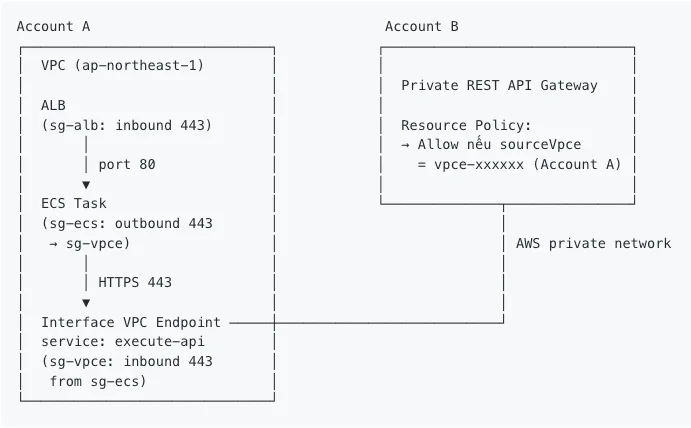
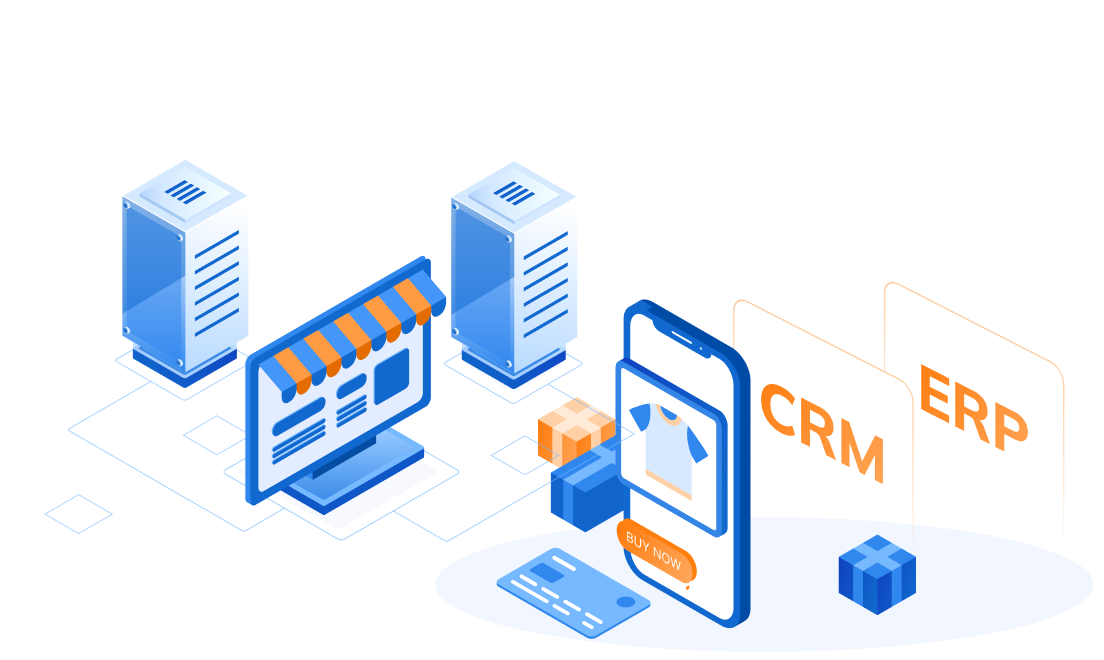
Key point: the VPCE acts as a private bridge between the two accounts. The request travels from ECS into the VPCE and then straight to the API Gateway, without going out to the internet and without passing through a NAT Gateway.
Setup, step by step
Step 1 (Account A): Create an Interface VPC Endpoint
Create an Interface type VPC Endpoint for the execute-api service:
VPC → Endpoints → Create Endpoint
  Service name      : com.amazonaws.ap-northeast-1.execute-api
  VPC               : VPC containing the ECS task
  Subnets           : subnet(s) containing the ECS task (must be in the same AZ)
  Enable private DNS: ON
  Security Group    : sg-vpce (create separately, see Step 3)
Why enable Private DNS? When turned on, AWS automatically creates a DNS record inside the VPC that resolves {api-id}.execute-api.{region}.amazonaws.com to the VPCE’s private IP instead of its public IP. This lets ECS call the normal URL while the traffic still stays inside the private network.
If it is off, you have to call the VPCE DNS directly with a special header, which is far more complicated.
Condition for Private DNS to work: the VPC must have both DNS Resolution and DNS Hostnames enabled. Check this at: VPC → Your VPCs → select VPC → Edit VPC settings
Step 2 (Account B): Create a Private REST API Gateway
API Gateway → Create API → REST API
  API endpoint type : Private
  VPC endpoint IDs  : LEAVE EMPTY
Important note: the VPC endpoint IDs field only accepts a VPCE from the same account. Entering Account A’s VPCE here will trigger a “not a valid VPC endpoint ID” error. Cross account authorization is handled entirely through the Resource Policy in the next step.
Create a resource and method, for example GET /mock with a Mock integration, then deploy it to the v0 stage.
Step 3 (Account B): Attach a Resource Policy to the API Gateway
This is the most important step for allowing cross account access. The Resource Policy works like a firewall at the API layer, checking every request before it is processed.
Go to API → Resource Policy → paste in the following policy:
{
  "Version": "2012-10-17",
  "Statement": [
    {
      "Effect": "Deny",
      "Principal": "*",
      "Action": "execute-api:Invoke",
      "Resource": "arn:aws:execute-api:ap-northeast-1:*:*/*/*/*",
      "Condition": {
        "StringNotEquals": {
          "aws:sourceVpce": "vpce-xxxxxxxxxxxxxxxxx"
        }
      }
    },
    {
      "Effect": "Allow",
      "Principal": "*",
      "Action": "execute-api:Invoke",
      "Resource": "arn:aws:execute-api:ap-northeast-1:*:*/*/*/*"
    }
  ]
}
Why do you need both Deny and Allow?
- Statement 1: deny every request that does not come from Account A’s VPCE
- Statement 2: allow everything else
AWS evaluates Deny before Allow, so the result is: only requests coming from the correct VPCE get through, and every other source is blocked, including requests from the internet or from other accounts.
Replace vpce-xxxxxxxxxxxxxxxxx with the actual VPCE ID from Step 1.
You must redeploy the API after changing the Resource Policy, otherwise the policy will not take effect. Actions → Deploy API → select stage → Deploy
Step 4 (Account A): Configure Security Groups
Use three separate Security Groups. This is the part that is easiest to get wrong:
sg-alb
| Direction | Type | Port | Source / Dest |
|---|---|---|---|
| Inbound | HTTPS | 443 | 0.0.0.0/0 |
| Outbound | HTTP | 80 | sg-ecs |
sg-ecs (attached to the ECS task)
| Direction | Type | Port | Source / Dest |
|---|---|---|---|
| Inbound | HTTP | 80 | sg-alb |
| Outbound | HTTPS | 443 | sg-vpce |
sg-vpce (attached to the VPC Endpoint)
| Direction | Type | Port | Source / Dest |
|---|---|---|---|
| Inbound | HTTPS | 443 | sg-ecs |
| Outbound | All | All | 0.0.0.0/0 |
Why does the VPCE need an Inbound rule instead of Outbound?
Many people get confused here. Traffic flows from the ECS task into the VPCE’s ENI, so from the VPCE’s point of view, that is inbound traffic. The VPCE does not pull data in; it receives the request from ECS and forwards it onward.
Step 5 (Account A): Check the ECS task configuration
The ECS task must use networkMode: awsvpc to get its own Security Group:
{
  "networkMode": "awsvpc",
  "networkConfiguration": {
    "awsvpcConfiguration": {
      "subnets": ["subnet-xxxxxxxx"],
      "securityGroups": ["sg-ecs-id"],
      "assignPublicIp": "DISABLED"
    }
  }
}
If you use networkMode: bridge or host, the ECS task will use the EC2 host’s Security Group, so you cannot control traffic separately for each task.
Warning: the ECS task’s subnet must be in the same AZ as the subnet chosen for the VPCE. If the AZs differ, traffic will still work but you will pay extra cross AZ cost and latency.
Errors encountered, and how to read each one
curl: (6) Could not resolve host
DNS could not resolve the hostname. Check right away:
# 1. Is the VPCE's Private DNS enabled?
aws ec2 describe-vpc-endpoints \
  --vpc-endpoint-ids vpce-xxxxxxxxx \
  --region ap-northeast-1 \
  --query 'VpcEndpoints[0].PrivateDnsEnabled'

# Must return: true

# 2. Are the VPC's DNS settings enabled?
aws ec2 describe-vpc-attribute --vpc-id vpc-xxxxxx --attribute enableDnsSupport
aws ec2 describe-vpc-attribute --vpc-id vpc-xxxxxx --attribute enableDnsHostnames

# Both must be: true
# 3. nslookup from inside the container, must return a private IP
nslookup {api-id}.execute-api.ap-northeast-1.amazonaws.com
# Correct result: 10.x.x.x or 172.x.x.x
# Wrong result: a public IP (3.x.x.x, 52.x.x.x, ...)
curl: (28) Failed to connect to port 443, timeout
DNS resolved correctly (returning a private IP) but the TCP connection was blocked. 99% of the time the cause is that the VPCE’s Security Group is missing an Inbound rule for port 443 from ECS.
# Check which SG is attached to the VPCE
aws ec2 describe-vpc-endpoints \
  --vpc-endpoint-ids vpce-xxxxxxxxx \
  --query 'VpcEndpoints[0].Groups'

# Check that SG's Inbound rules
aws ec2 describe-security-groups \
  --group-ids sg-xxxxxxxxx \
  --query 'SecurityGroups[0].IpPermissions'
403, explicit deny in a resource based policy
The TCP connection succeeded, meaning the request reached the API Gateway. But the Resource Policy is blocking it for one of two reasons:
- The VPCE ID in the policy is wrong, either copied incorrectly or left as a placeholder
- The API was not redeployed after editing the policy. I hit this one myself and spent a long time debugging it without finding the cause
Fix: recheck the VPCE ID in the policy, then redeploy the API.
A quick debugging trick when you do not know where the error is
Instead of curling the API’s domain, curl the VPCE DNS directly with the x-apigw-api-id header:
# Step 1, get the VPCE's DNS name
aws ec2 describe-vpc-endpoints \
  --vpc-endpoint-ids vpce-xxxxxxxxx \
  --region ap-northeast-1 \
  --query 'VpcEndpoints[0].DnsEntries[0].DnsName' \
  --output text
# Step 2, curl directly to the VPCE DNS
curl -v https://{vpce-dns-name}/v0/mock \
  -H "x-apigw-api-id: {api-id}"
This approach completely bypasses Private DNS, so the result will point directly to the layer that has the problem:
| Result | Layer at fault | How to fix |
|---|---|---|
| (28) timeout | Security Group | Check Inbound 443 on sg-vpce |
| (6) resolve | VPCE’s DNS | VPCE not yet available or wrong region |
| 403 explicit deny | Resource Policy | Fix the policy and redeploy the API |
| 200 OK here but fails when using the domain | Private DNS | Enable Private DNS on the VPCE |
Checklist before you start debugging
- Are the VPCE and API Gateway in the same region?
- Are DNS Resolution and DNS Hostnames enabled on the VPC?
- Is Private DNS enabled on the VPCE?
- Does nslookup return a private IP (10.x.x.x) or a public IP?
- Does sg-vpce have an Inbound rule for 443 from sg-ecs?
- Are the ECS task and the VPCE in the same AZ?
- Does the ECS task use networkMode: awsvpc?
- Does the Resource Policy have the correct sourceVpce condition?
- Was the API redeployed after editing the Resource Policy?
Closing thoughts
Looking back, no single step was too complex. There were just many steps, and each one could fail in its own way. The hard part was not the technical difficulty, it was knowing what to check first.
I hope this saves someone on the team an afternoon. If you run into another error, ping me and I will add it here.