
















Online MySQL Schema Migration Safely On Production with gh-ost – Testing On On-premise Database
07/08/2026
205
Surely, at some point in their application development career, every developer has updated a database schema at least once: adding a new table, adding a new column, changing a column’s data type, creating an additional index, etc.
The familiar commands you’d typically run are:
- Laravel: php artisan migrate
- Prisma: pnpm prisma migrate deploy
- SQL:
ALTER TABLE ...
CREATE INDEX ...
For tables that need to be migrated with a small size (<500 MB), or a small number of records (<500k), running the above commands is a reasonable choice.
So what about tables with a size > 10GB, or with a record count > 1 million?
- What impact will running the migration directly have?
- How can migration be run safely on production?
This article will help answer the above questions.
Setting Up the Test Environment

Create the sbtest1 table with 2 million records, with the schema below:
CREATE TABLE `sbtest1` (
  `id` int NOT NULL,
  `k` int NOT NULL DEFAULT '0',
  `c` char(120) NOT NULL DEFAULT '',
  `pad` char(60) NOT NULL DEFAULT '',
  PRIMARY KEY (`id`)
) ENGINE=InnoDB DEFAULT CHARSET=utf8mb4 COLLATE=utf8mb4_0900_ai_ci;
by running the sysbench command:
(sysbench)$ sysbench --db-driver=mysql \
  --mysql-user=sysbench --mysql-password=123456789 --mysql-db=sysbench \
  --tables=1 --table-size=2000000 --auto-inc=off --threads=20 --time=0 --rate=2 \
  --rand-type=pareto --report-interval=1 --mysql-host=10.10.10.21 \
  oltp_read_write prepare 2>&1 | tee sysbench.log

Initializing worker threads...

Creating table 'sbtest1'...
Inserting 2000000 records into 'sbtest1'
Creating a secondary index on 'sbtest1'...
Test Scenario
Change the data type of column k from int to bigint on the sbtest1 table while the application is still executing queries (simulated via sysbench with 20 threads running in parallel) across 2 scenarios:
#1: Connect to the database and execute the query:
ALTER TABLE sbtest1 MODIFY COLUMN k BIGINT NOT NULL;This will answer question #1: – What impact will running the migration directly have?
#2: Use gh-ost to ALTER TABLE
This will answer question #2: – How can migration be run safely on production?
Scenario #1: Connect to the database and execute the query
Step 1: Run sysbench to simulate queries from the application
ubuntu@sysbench:~$ sysbench --db-driver=mysql --mysql-user=sysbench --mysql-password=123456789 --mysql-db=sysbench --tables=1 --table-size=2000000 --auto-inc=off --threads=20 --time=0 --rate=2 --rand-type=pareto --report-interval=1 --mysql-host=10.10.10.21 oltp_read_write run 2>&1 | tee sysbench.log
WARNING: Both event and time limits are disabled, running an endless test
sysbench 1.0.20 (using system LuaJIT 2.1.0-beta3)

Running the test with following options:
Number of threads: 20
Target transaction rate: 2/sec
Report intermediate results every 1 second(s)
Initializing random number generator from current time


Initializing worker threads...

Threads started!

[ 1s ] thds: 20 tps: 0.00 qps: 0.00 (r/w/o: 0.00/0.00/0.00) lat (ms,95%): 0.00 err/s: 0.00 reconn/s: 0.00
[ 1s ] queue length: 0, concurrency: 0
[ 2s ] thds: 20 tps: 2.00 qps: 40.02 (r/w/o: 28.02/8.00/4.00) lat (ms,95%): 27.17 err/s: 0.00 reconn/s: 0.00
[ 2s ] queue length: 0, concurrency: 0
[ 3s ] thds: 20 tps: 3.00 qps: 60.01 (r/w/o: 42.01/12.00/6.00) lat (ms,95%): 25.28 err/s: 0.00 reconn/s: 0.00
[ 3s ] queue length: 0, concurrency: 0
[ 4s ] thds: 20 tps: 0.00 qps: 0.00 (r/w/o: 0.00/0.00/0.00) lat (ms,95%): 0.00 err/s: 0.00 reconn/s: 0.00
[ 4s ] queue length: 0, concurrency: 0
[ 5s ] thds: 20 tps: 7.00 qps: 139.98 (r/w/o: 97.99/28.00/14.00) lat (ms,95%): 28.16 err/s: 0.00 reconn/s: 0.00
[ 5s ] queue length: 0, concurrency: 0
[ 6s ] thds: 20 tps: 0.00 qps: 0.00 (r/w/o: 0.00/0.00/0.00) lat (ms,95%): 0.00 err/s: 0.00 reconn/s: 0.00
[ 6s ] queue length: 0, concurrency: 0
[ 7s ] thds: 20 tps: 6.00 qps: 120.02 (r/w/o: 84.01/24.00/12.00) lat (ms,95%): 32.53 err/s: 0.00 reconn/s: 0.00
[ 7s ] queue length: 0, concurrency: 0
[ 8s ] thds: 20 tps: 3.00 qps: 97.99 (r/w/o: 69.99/20.00/8.00) lat (ms,95%): 37.56 err/s: 0.00 reconn/s: 0.00
Step 2: Run ALTER TABLE using TablePlus
ALTER TABLE sbtest1 MODIFY COLUMN k BIGINT NOT NULL;Result: It took ~103 seconds for the above query to complete.

Observations
The number of queries executed by sysbench dropped to 0 after executing the ALTER TABLE query
[ 162s ] thds: 20 tps: 0.00 qps: 30.00 (r/w/o: 28.00/0.00/2.00) lat (ms,95%): 0.00 err/s: 0.00 reconn/s: 0.00
[ 162s ] queue length: 0, concurrency: 16
[ 163s ] thds: 20 tps: 0.00 qps: 29.99 (r/w/o: 27.99/0.00/2.00) lat (ms,95%): 0.00 err/s: 0.00 reconn/s: 0.00
[ 163s ] queue length: 0, concurrency: 18
[ 164s ] thds: 20 tps: 0.00 qps: 15.00 (r/w/o: 14.00/0.00/1.00) lat (ms,95%): 0.00 err/s: 0.00 reconn/s: 0.00
[ 164s ] queue length: 0, concurrency: 19
[ 165s ] thds: 20 tps: 0.00 qps: 0.00 (r/w/o: 0.00/0.00/0.00) lat (ms,95%): 0.00 err/s: 0.00 reconn/s: 0.00
[ 165s ] queue length: 0, concurrency: 19
[ 166s ] thds: 20 tps: 0.00 qps: 15.00 (r/w/o: 14.00/0.00/1.00) lat (ms,95%): 0.00 err/s: 0.00 reconn/s: 0.00
[ 166s ] queue length: 2, concurrency: 20
[ 167s ] thds: 20 tps: 0.00 qps: 0.00 (r/w/o: 0.00/0.00/0.00) lat (ms,95%): 0.00 err/s: 0.00 reconn/s: 0.00
[ 167s ] queue length: 3, concurrency: 20
[ 168s ] thds: 20 tps: 0.00 qps: 0.00 (r/w/o: 0.00/0.00/0.00) lat (ms,95%): 0.00 err/s: 0.00 reconn/s: 0.00
...
[ 257s ] thds: 20 tps: 0.00 qps: 0.00 (r/w/o: 0.00/0.00/0.00) lat (ms,95%): 0.00 err/s: 0.00 reconn/s: 0.00
[ 257s ] queue length: 185, concurrency: 20
[ 258s ] thds: 20 tps: 0.00 qps: 20.00 (r/w/o: 0.00/0.00/20.00) lat (ms,95%): 0.00 err/s: 20.00 reconn/s: 0.00
[ 258s ] queue length: 185, concurrency: 20
[ 259s ] thds: 20 tps: 31.00 qps: 904.97 (r/w/o: 691.97/150.99/62.00) lat (ms,95%): 100000.00 err/s: 0.00 reconn/s: 0.00
[ 259s ] queue length: 156, concurrency: 20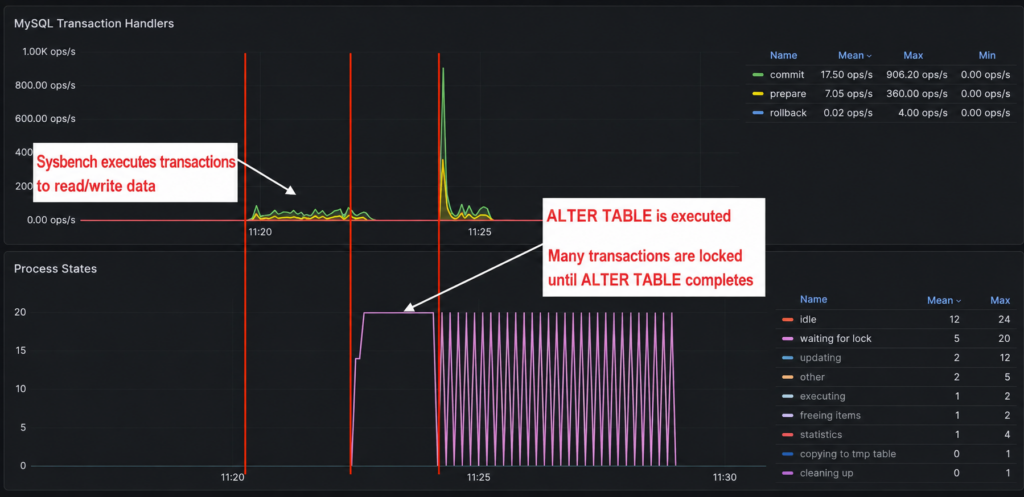
- From the moment ALTER TABLE is executed, the transactions generated by sysbench cannot execute because they must wait for the lock to be released
- For a PROD application that still has connections from end users, this can lead to timeout errors as well as continuous retry actions, overloading the server and database
Scenario #2: Use gh-ost to ALTER TABLE
Step 1: Run sysbench to simulate queries from the application
ubuntu@sysbench:~$ sysbench --db-driver=mysql --mysql-user=sysbench --mysql-password=123456789 --mysql-db=sysbench --tables=1 --table-size=2000000 --auto-inc=off --threads=20 --time=0 --rate=2 --rand-type=pareto --report-interval=1 --mysql-host=10.10.10.21 oltp_read_write run 2>&1 | tee sysbench.log
WARNING: Both event and time limits are disabled, running an endless test
sysbench 1.0.20 (using system LuaJIT 2.1.0-beta3)

Running the test with following options:
Number of threads: 20
Target transaction rate: 2/sec
Report intermediate results every 1 second(s)
Initializing random number generator from current time


Initializing worker threads...

Threads started!

[ 1s ] thds: 20 tps: 1.99 qps: 39.90 (r/w/o: 27.93/7.98/3.99) lat (ms,95%): 28.16 err/s: 0.00 reconn/s: 0.00
[ 1s ] queue length: 0, concurrency: 0
[ 2s ] thds: 20 tps: 2.00 qps: 40.03 (r/w/o: 28.02/8.01/4.00) lat (ms,95%): 24.83 err/s: 0.00 reconn/s: 0.00
[ 2s ] queue length: 0, concurrency: 0
[ 3s ] thds: 20 tps: 3.00 qps: 59.99 (r/w/o: 42.00/12.00/6.00) lat (ms,95%): 87.56 err/s: 0.00 reconn/s: 0.00
[ 3s ] queue length: 0, concurrency: 0
[ 4s ] thds: 20 tps: 1.00 qps: 20.00 (r/w/o: 14.00/4.00/2.00) lat (ms,95%): 25.28 err/s: 0.00 reconn/s: 0.00
[ 4s ] queue length: 0, concurrency: 0
[ 5s ] thds: 20 tps: 0.00 qps: 0.00 (r/w/o: 0.00/0.00/0.00) lat (ms,95%): 0.00 err/s: 0.00 reconn/s: 0.00
[ 5s ] queue length: 0, concurrency: 0
[ 6s ] thds: 20 tps: 1.00 qps: 20.00 (r/w/o: 14.00/4.00/2.00) lat (ms,95%): 27.66 err/s: 0.00 reconn/s: 0.00
[ 6s ] queue length: 0, concurrency: 0
[ 7s ] thds: 20 tps: 4.00 qps: 80.00 (r/w/o: 56.00/16.00/8.00) lat (ms,95%): 29.19 err/s: 0.00 reconn/s: 0.00
[ 7s ] queue length: 0, concurrency: 0
[ 8s ] thds: 20 tps: 0.00 qps: 0.00 (r/w/o: 0.00/0.00/0.00) lat (ms,95%): 0.00 err/s: 0.00 reconn/s: 0.00
[ 8s ] queue length: 0, concurrency: 0
[ 9s ] thds: 20 tps: 1.00 qps: 20.00 (r/w/o: 14.00/4.00/2.00) lat (ms,95%): 25.74 err/s: 0.00 reconn/s: 0.00
[ 9s ] queue length: 0, concurrency: 0
[ 10s ] thds: 20 tps: 1.00 qps: 20.00 (r/w/o: 14.00/4.00/2.00) lat (ms,95%): 26.68 err/s: 0.00 reconn/s: 0.00
Step 2: Run ALTER TABLE using gh-ost
ubuntu@ghost:~$ gh-ost -allow-on-master -assume-rbr -exact-rowcount \
  -critical-load Threads_running=400 -critical-load-hibernate-seconds 60 \
  -database sysbench -max-load Threads_running=100 -nice-ratio 0.1 \
  -chunk-size 5000 -ask-pass -table sbtest1 -user sysbench \
  -host 10.10.10.21 \
  -postpone-cut-over-flag-file /home/ubuntu/gh-ost-sentinel \
  -throttle-additional-flag-file /home/ubuntu/gh-ost-throttle_ghost.sbtest1 \
  -alter 'MODIFY COLUMN k BIGINT NOT NULL' \
  -verbose -execute 2>&1 | tee gh-ost.log
Observations
gh-ost will create a temporary table _sbtest1_gho with the changed schema, while replicating data from the binlog to the temporary table.
...
2026-07-31 04:49:06 INFO Creating changelog table `sysbench`.`_sbtest1_ghc`
2026-07-31 04:49:06 INFO Changelog table created
2026-07-31 04:49:06 INFO Creating ghost table `sysbench`.`_sbtest1_gho`
2026-07-31 04:49:06 INFO Ghost table created
...
The migration status will be continuously updated on the console along with the estimated completion time.
2026-07-31 04:51:55 INFO Copy: 1769971/2000033 88.5%; Applied: 1368; Backlog: 7/1000; Time: 2m49s(total), 2m49s(copy); streamer: mysql-bin.000126:37345813; Lag: 0.03s, HeartbeatLag: 0.05s, State: migrating; ETA: 15s []
Copy: 1779971/2000033 89.0%; Applied: 1384; Backlog: 2/1000; Time: 2m50s(total), 2m50s(copy); streamer: mysql-bin.000126:39311023; Lag: 0.03s, HeartbeatLag: 0.05s, State: migrating; ETA: 22s
2026-07-31 04:51:56 INFO Copy: 1779971/2000033 89.0%; Applied: 1384; Backlog: 2/1000; Time: 2m50s(total), 2m50s(copy); streamer: mysql-bin.000126:39311023; Lag: 0.03s, HeartbeatLag: 0.05s, State: migrating; ETA: 22s []
Copy: 1789970/2000033 89.5%; Applied: 1384; Backlog: 9/1000; Time: 2m51s(total), 2m51s(copy); streamer: mysql-bin.000126:41266025; Lag: 0.03s, HeartbeatLag: 0.05s, State: migrating; ETA: 21s
2026-07-31 04:51:57 INFO Copy: 1789970/2000033 89.5%; Applied: 1384; Backlog: 9/1000; Time: 2m51s(total), 2m51s(copy); streamer: mysql-bin.000126:41266025; Lag: 0.03s, HeartbeatLag: 0.05s, State: migrating; ETA: 21s []
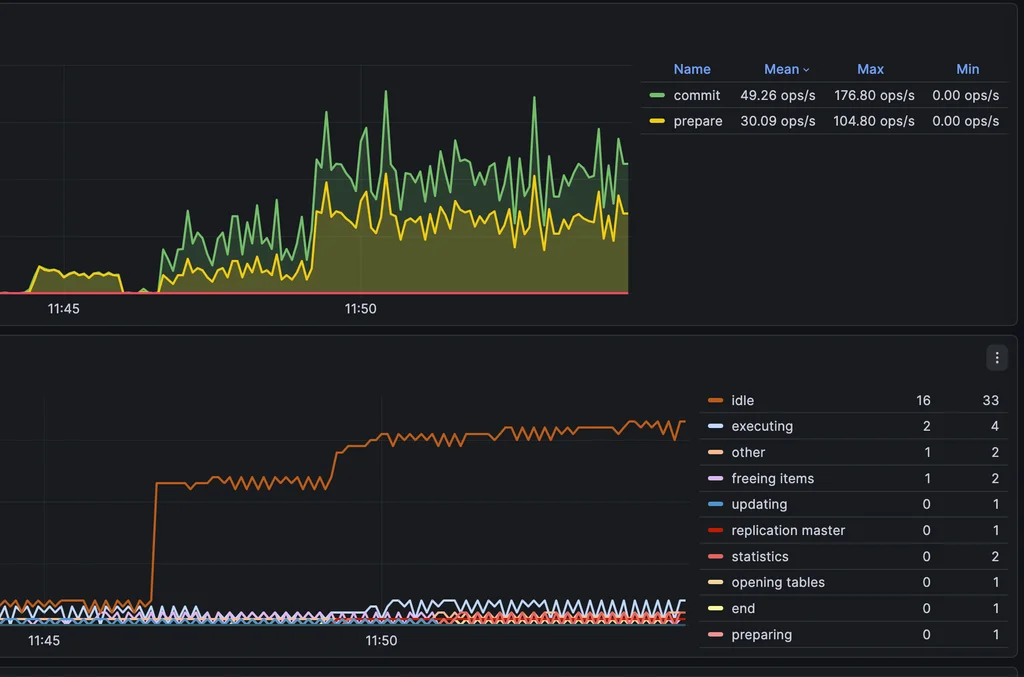
Sysbench continues to generate transactions and execute normally
[ 365s ] thds: 20 tps: 1.00 qps: 20.00 (r/w/o: 14.00/4.00/2.00) lat (ms,95%): 41.10 err/s: 0.00 reconn/s: 0.00
[ 365s ] queue length: 0, concurrency: 0
[ 366s ] thds: 20 tps: 2.00 qps: 40.01 (r/w/o: 28.01/8.00/4.00) lat (ms,95%): 158.63 err/s: 0.00 reconn/s: 0.00
[ 366s ] queue length: 0, concurrency: 0
[ 367s ] thds: 20 tps: 1.00 qps: 20.00 (r/w/o: 14.00/4.00/2.00) lat (ms,95%): 27.66 err/s: 0.00 reconn/s: 0.00
[ 367s ] queue length: 0, concurrency: 0
[ 368s ] thds: 20 tps: 2.00 qps: 40.00 (r/w/o: 28.00/8.00/4.00) lat (ms,95%): 34.33 err/s: 0.00 reconn/s: 0.00
[ 368s ] queue length: 0, concurrency: 0
[ 369s ] thds: 20 tps: 2.00 qps: 40.01 (r/w/o: 28.01/8.00/4.00) lat (ms,95%): 37.56 err/s: 0.00 reconn/s: 0.00
[ 369s ] queue length: 0, concurrency: 0
[ 370s ] thds: 20 tps: 1.00 qps: 20.00 (r/w/o: 14.00/4.00/2.00) lat (ms,95%): 38.94 err/s: 0.00 reconn/s: 0.00
[ 370s ] queue length: 0, concurrency: 0
When the migration process succeeds, gh-ost will wait until the user performs the cutover
Copy: 1999967/1999967 100.0%; Applied: 2056; Backlog: 10/1000; Time: 4m18s(total), 3m19s(copy); streamer: mysql-bin.000126:83173640; Lag: 0.03s, HeartbeatLag: 0.05s, State: postponing cut-over; ETA: due
2026-07-31 04:53:24 INFO Copy: 1999967/1999967 100.0%; Applied: 2056; Backlog: 10/1000; Time: 4m18s(total), 3m19s(copy); streamer: mysql-bin.000126:83173640; Lag: 0.03s, HeartbeatLag: 0.05s, State: postponing cut-over; ETA: due []
Copy: 1999967/1999967 100.0%; Applied: 2056; Backlog: 18/1000; Time: 4m19s(total), 3m19s(copy); streamer: mysql-bin.000126:83181674; Lag: 0.03s, HeartbeatLag: 0.05s, State: postponing cut-over; ETA: due
2026-07-31 04:53:25 INFO Copy: 1999967/1999967 100.0%; Applied: 2056; Backlog: 18/1000; Time: 4m19s(total), 3m19s(copy); streamer: mysql-bin.000126:83181674; Lag: 0.03s, HeartbeatLag: 0.05s, State: postponing cut-over; ETA: due []
Copy: 1999967/1999967 100.0%; Applied: 2068; Backlog: 13/1000; Time: 4m20s(total), 3m19s(copy); streamer: mysql-bin.000126:83195108; Lag: 0.03s, HeartbeatLag: 0.05s, State: postponing cut-over; ETA: due
2026-07-31 04:53:26 INFO Copy: 1999967/1999967 100.0%; Applied: 2068; Backlog: 13/1000; Time: 4m20s(total), 3m19s(copy); streamer: mysql-bin.000126:83195108; Lag: 0.03s, HeartbeatLag: 0.05s, State: postponing cut-over; ETA: due []
Copy: 1999967/1999967 100.0%; Applied: 2072; Backlog: 21/1000; Time: 4m21s(total), 3m19s(copy); streamer: mysql-bin.000126:83206697; Lag: 0.03s, HeartbeatLag: 0.05s, State: postponing cut-over; ETA: due
2026-07-31 04:53:27 INFO Copy: 1999967/1999967 100.0%; Applied: 2072; Backlog: 21/1000; Time: 4m21s(total), 3m19s(copy); streamer: mysql-bin.000126:83206697; Lag: 0.03s, HeartbeatLag: 0.05s, State: postponing cut-over; ETA: due []
Copy: 1999967/1999967 100.0%; Applied: 2084; Backlog: 9/1000; Time: 4m22s(total), 3m19s(copy); streamer: mysql-bin.000126:83216418; Lag: 0.03s, HeartbeatLag: 0.05s, State: postponing cut-over; ETA: due
The table is not locked; read/write operations continue normally while the migration process is still running
When the Lag value is at an acceptable low level, perform the cutover. Open a new console and access the gh-ost server to send the cut-over command, while keeping the current migration console open.
ubuntu@ghost:~$ echo "unpostpone" | nc -U /tmp/gh-ost.sysbench.sbtest1.sock
Unpostponed
# Migrating `sysbench`.`sbtest1`; Ghost table is `sysbench`.`_sbtest1_gho`
# Migrating mysql:3306; inspecting mysql:3306; executing on ghost
# Migration started at Fri Jul 31 04:49:06 +0000 2026
# chunk-size: 5000; max-lag-millis: 1500ms; dml-batch-size: 10; max-load: Threads_running=100; critical-load: Threads_running=400; nice-ratio: 0.100000
# throttle-additional-flag-file: /home/ubuntu/gh-ost-throttle_ghost.sbtest1
# postpone-cut-over-flag-file: /home/ubuntu/gh-ost-sentinel [set]
# Serving on unix socket: /tmp/gh-ost.sysbench.sbtest1.sock
Copy: 1999967/1999967 100.0%; Applied: 3320; Backlog: 2/1000; Time: 9m6s(total), 3m19s(copy); streamer: mysql-bin.000126:85592354; Lag: 0.03s, HeartbeatLag: 0.06s, State: postponing cut-over; ETA: due
ubuntu@ghost:~$
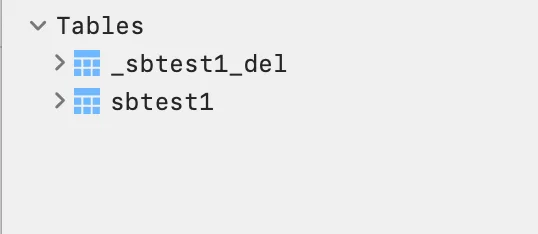
The ALTER TABLE process is complete; the sbtest1 table will be renamed to _sbtest1_del for backup, and the _sbtest1_gho table (already altered) will be renamed to sbtest1.
Read related articles:
- Troubleshooting ALB mTLS with GMO CA Bundle
- Cross Account API Calls via VPC Endpoint: A Debugging Log
- Rollback Aurora MySQL’s Major Version Upgrade When Delta Data Already Exists
Conclusion
- Migrating the data schema directly is still effective in situations with small data
- For tables with a large number of records or large size, consider using gh-ost to reduce lock impact
FAQs Section
An online MySQL schema migration changes a table’s structure while the database continues serving application queries. The goal is to reduce blocking and disruption during the migration.
gh-ost creates a temporary table with the new schema, copies existing data, and applies ongoing changes from the MySQL binary log. During cutover, it renames the tables so the migrated table replaces the original.
A direct ALTER TABLE can cause transactions to wait and reduce database throughput. gh-ost moves most of the migration work to a separate table, giving teams more control over progress and cutover timing.
No. gh-ost reduces the impact of schema changes, but the final cutover still requires a brief metadata lock. Teams should monitor database load and replication lag, then schedule the cutover carefully.